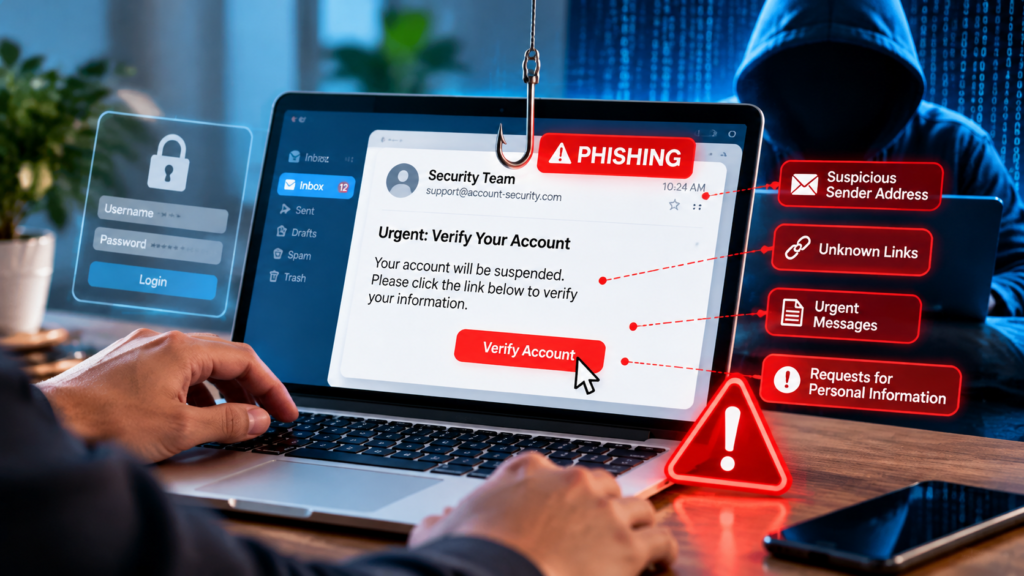
Phishing messages often pretend to come from a bank, delivery company, employer or familiar online service. They may ask you to click a link, open an attachment or share a password.
Common warning signs
Look for unexpected urgency, unusual payment requests, unfamiliar sender addresses, mismatched links and requests for sensitive information. Poor spelling can be a clue, but polished messages can also be fraudulent.
Check before acting
Do not use the link in a suspicious message. Open the company's official app or type its known address yourself. Contact the sender through a separate trusted channel if a request seems unusual.
If you clicked
Close the page and do not enter information. If you shared a password, change it from the official site and review account sessions. Contact your bank quickly if payment details were exposed.
The takeaway
Pause, verify and report suspicious messages. A few seconds of checking can prevent a costly mistake.
('Make the advice part of a routine', 'Choose a regular time to review account recovery details, software updates and security alerts. Prioritize email and financial accounts because they can provide access to many other services. If you manage devices for a workplace, follow its incident reporting and acceptable-use policies.')
('If something looks wrong', 'Do not delete evidence or continue interacting with a suspicious message. Use a separate trusted device to change affected credentials, revoke unknown sessions and contact the service provider through its official channel. For work systems, notify the responsible IT or security team promptly.')
Frequently asked questions
What is the first practical step to improve protection?
Secure your most important accounts first, use unique passwords and multi-factor authentication, and keep devices updated.
Why does context matter?
Specifications, availability and best practices can differ by product, region and date. Check current official documentation before making a purchase or changing an important system.